
Some tech products feel exciting the moment you see them. Others sound unnecessary, boring, or like solutions to problems you don’t really have. These are the second type. We had a quick look on. them in the post “Smart home devices that are worth buying (and those that aren’t)“. Now let’s look closer.
None of the products below felt essential when I first heard about them. I didn’t rush to buy them, and in a few cases, I actively thought they were overrated. But after using them for a while, they quietly became part of my everyday routine – and that’s usually the best sign that a piece of tech is actually worth it.
These aren’t flashy gadgets. They don’t demand attention. They simply remove small annoyances you didn’t realize were adding up.
1. Smart plug

A smart plug looks almost too simple to matter. It doesn’t have a screen, doesn’t feel futuristic, and doesn’t do anything dramatic. It just sits between the wall outlet and whatever device you plug into it.
That simplicity is exactly why it works.
With a smart plug, you can schedule lamps to turn on automatically in the evening, shut off heaters after a set time, or control devices remotely from your phone. Over time, you stop thinking about whether something is on or off — it just happens.
What it’s best for:
- Lamps and ambient lighting
- Space heaters or fans
- Coffee makers and kettles
- Holiday lights
Typical price range:
- $10–$20 per plug
- $25–$40 for multi-packs
Buying tips:
- Match the plug to your ecosystem (Google Assistant, Alexa, or Apple Home)
- Avoid plugs that require a subscription
- Choose compact designs so they don’t block nearby outlets
Why I didn’t think I needed it:
Flipping a switch felt easy enough.
Why I was wrong:
Removing dozens of tiny daily decisions makes a bigger difference than expected.
2. Wireless charging stand
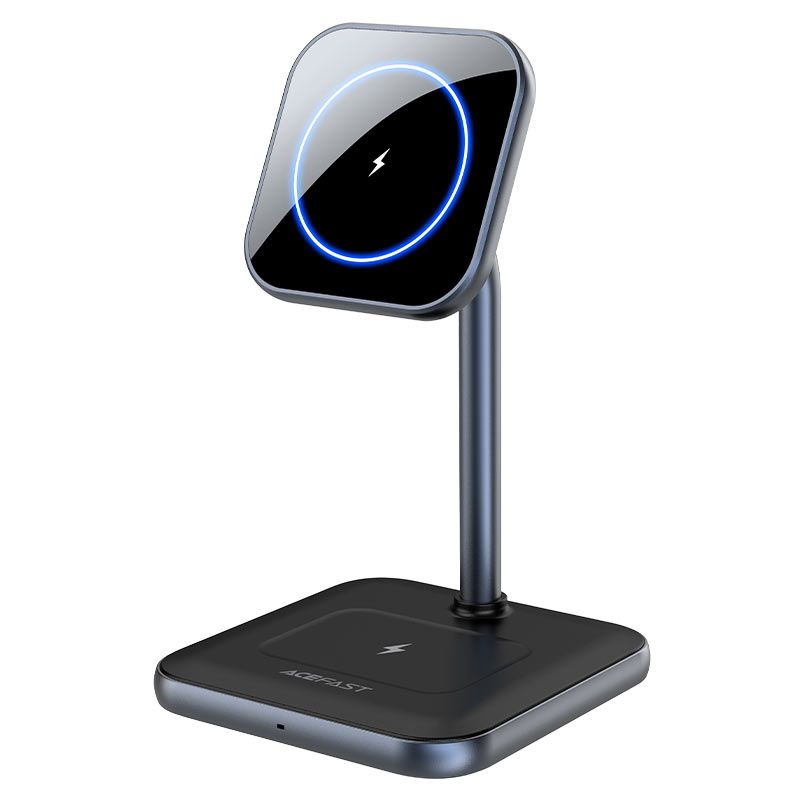
I avoided wireless charging for a long time. Early chargers were slow, unreliable, and often overheated. Plugging in a cable felt simpler and faster.
A charging stand changed my mind.
Instead of placing your phone flat on a pad, a stand keeps it upright and visible. You drop your phone on it while working, cooking, or checking notifications, and it stays topped up throughout the day. No cables to connect. No ports to wear out.
It’s not about charging speed — it’s about convenience.
What it’s best for:
- Desk setups
- Nightstands
- Casual daytime charging
Typical price range:
- $20–$35 for reliable basic models
- $40–$70 for fast or multi-device stands
Buying tips:
- Check charging wattage compatibility with your phone
- Look for a weighted base so the stand doesn’t tip over
- Avoid ultra-cheap models with poor heat management
Why I didn’t think I needed it:
Cables already worked fine.
Why I was wrong:
Less friction beats slightly faster charging.
3. Noise-canceling earbuds

I used to associate noise-canceling earbuds with airplanes and long trips. If you weren’t traveling often, they seemed like an expensive luxury.
That assumption didn’t last long.
Noise cancellation turned out to be useful almost everywhere: working from home, walking in busy areas, taking calls in public, or just blocking background noise without listening to music. You don’t realize how much constant noise you’re filtering out until it’s gone.
What’s changed recently is accessibility. You no longer need the most expensive models to get good noise cancellation.
What it’s best for
- Focus and productivity
- Calls in noisy environments
- Commuting and travel
Typical price range
- $80–$120 for good mid-range models
- $150–$250+ for premium options
Buying tips
- Battery life matters more than maximum noise cancellation
- Transparency or ambient modes are essential for daily use
- Fit is critical — poor fit ruins noise cancellation
Why I didn’t think I needed it:
I didn’t travel enough to justify the cost.
Why I was wrong:
Daily noise adds more stress than you notice.
4. Password manager

A password manager sounds boring — and maybe even annoying — until you start using one.
Before using one, most people rely on reused passwords, browser memory, or constant resets. A password manager changes that by generating strong, unique passwords and autofilling them instantly across apps and websites.
The biggest surprise wasn’t security — it was convenience. Logging in becomes effortless, and you stop thinking about passwords altogether.
What it’s best for
- Managing dozens of logins securely
- Autofilling passwords instantly
- Reducing “forgot password” loops
Typical price range
- Free (basic, single-device use)
- $20–$40 per year for full access
Buying tips
- Make sure it works across all your devices
- Enable two-factor authentication
- Look for secure password sharing if you need it
Why I didn’t think I needed it:
Remembering passwords felt manageable.
Why I was wrong:
Manual password management is unnecessary friction.
5. Robot vacuum

Robot vacuums are easy to dismiss. They’re not as powerful as regular vacuums, they miss spots, and they can get stuck. All of that is true — and still misses the point.
A robot vacuum isn’t about deep cleaning. It’s about consistency.
Running it regularly keeps floors clean enough that dirt and dust never build up. You still vacuum manually sometimes, but far less often. Over time, that reduction in effort becomes surprisingly valuable.
What it’s best for
- Daily maintenance cleaning
- Pet hair and dust
- Reducing how often you vacuum manually
Typical price range
- $200–$350 for basic, reliable models
- $400–$700+ for mapping and mopping features
Buying tips
- Mapping and room selection are worth paying extra for
- Avoid ultra-cheap models with random navigation
- Check the cost of replacement filters and brushes
Why I didn’t think I needed it:
I assumed it wouldn’t clean well enough.
Why I was wrong:
Consistency matters more than perfection.
What all these products have in common
None of these devices are exciting on their own. They don’t try to impress you with specs or flashy features. What they share is something far more valuable: they reduce friction.
They save small amounts of time and mental energy every day. And when that happens consistently, the impact feels much bigger than expected.
Final thoughts
The tech products that make the biggest difference aren’t always the ones you’re excited to buy. They’re the ones you forget about — because life just gets a little easier with them around.
If a device fades into the background and quietly removes small annoyances, that’s usually a sign you didn’t know you needed it.