
For the past decade, AI in code editors meant one thing: smarter autocomplete. Better suggestions, context-aware completions, maybe a chat window to ask questions. Useful, but incremental. AI was a passenger in your IDE – you drove, it occasionally pointed out shortcuts.
Agent Mode in Android Studio changes that relationship entirely. And if you haven’t tried it yet, the gap between what you’re reading about it and what it actually feels like to use is larger than you’d expect.
What Agent Mode Actually Is
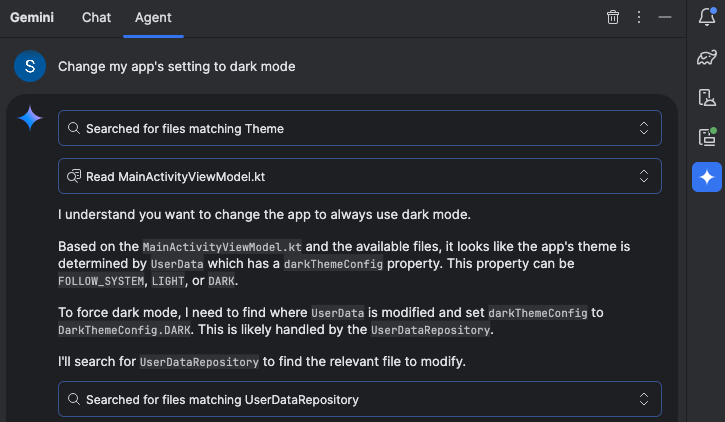
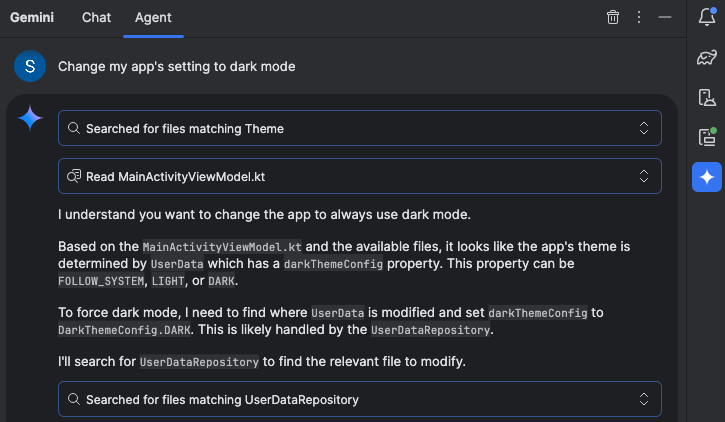
The simplest way to describe it: you give Android Studio a goal, not instructions.
With Agent Mode, you can describe a complex goal in natural language — from generating unit tests to complex refactors – and the agent formulates an execution plan that can span multiple files in your project and executes under your direction.
This is fundamentally different from chat-based AI assistance. When you ask Gemini a question in the chat window, it responds with suggestions you then implement manually. When you give Agent Mode a task, the agent creates a plan, determines which tools are needed, executes those tools, evaluates the results, and keeps iterating until the task is complete.
It’s the difference between asking a colleague “how would you approach adding unit tests to this ViewModel?” and saying “add comprehensive unit tests to this ViewModel” and watching it actually happen.
What It Can Do Right Now
Agent Mode is designed to handle complex, multi-stage development tasks. You can describe a high-level goal, like adding a new feature, generating comprehensive unit tests, or fixing a nuanced bug.
In practice, the tasks it handles well include things that used to consume large portions of a developer’s day: generating test coverage for existing code, refactoring components to follow updated architecture patterns, fixing build errors that cascade across multiple files, and updating UI components to new Compose APIs.
Agent Mode uses a range of IDE tools for reading and modifying code, building the project, searching the codebase, and more to help Gemini complete complex tasks from start to finish with minimal oversight.
That last part matters. It’s not just reading your code — it’s building it, running it, seeing what breaks, and fixing those breaks. The loop that a developer manually runs dozens of times per day is now something the agent can run autonomously.
You’re Still in Control
Before this sounds like science fiction or a job threat, the implementation is deliberately conservative about developer control. You are firmly in control, with the ability to review, refine and guide the agent’s output at every step. When the agent proposes code changes, you can choose to accept or reject them.
Every proposed change waits for your approval before being applied. You can see exactly what the agent plans to do before it does anything. If a proposed change doesn’t look right, you reject it and redirect.
There’s also an “Auto-approve” option if you are feeling lucky — especially useful when you want to iterate on ideas as rapidly as possible. Most developers will keep auto-approve off initially and develop a sense of when the agent’s judgment can be trusted for specific task types.
This design reflects a realistic understanding of where AI assistance is today: capable enough to handle large, well-defined tasks autonomously, but still requiring human judgment for the decisions that actually matter.
The Context Window Is the Key Ingredient
What makes Agent Mode different from previous AI coding assistants isn’t just the agentic architecture — it’s the context window backing it.
You can add your own Gemini API key to expand Agent Mode’s context window to a massive 1 million tokens with Gemini 2.5 Pro. A larger context window lets you send more instructions, code, and attachments to Gemini, leading to even higher quality responses. This is especially useful when working with agents, as the larger context provides Gemini 2.5 Pro with the ability to reason about complex or long-running tasks.
For context: a million tokens can hold roughly 750,000 words of text. That means Agent Mode can hold your entire codebase in context simultaneously, not just the file you’re currently editing. It understands how your ViewModel connects to your Repository connects to your data layer — and that holistic understanding is what enables it to make changes across multiple files without breaking things.
Previous AI coding tools that worked on single files or small snippets were limited precisely because they couldn’t see the whole picture. Agent Mode can.
Journeys: AI-Powered UI Testing
Alongside Agent Mode, Android Studio introduced another agentic feature worth knowing about: Journeys.
Journeys for Android Studio leverages the reasoning and vision capabilities of Gemini to enable you to write and maintain end-to-end UI tests using natural language instructions. These natural language instructions are converted into interactions that Gemini performs directly on your app.
The practical impact: instead of writing detailed UI test code that breaks every time your layout changes, you write instructions like “navigate to the checkout screen and complete a purchase with the test card.” Gemini figures out how to execute that intent against your actual running app.
Because Gemini reasons about how to achieve your goals, these tests are more resilient to subtle changes in your app’s layout, significantly reducing flaky tests when running against different app versions or device configurations.
Flaky tests are one of the most persistent sources of wasted time in Android development. If Journeys delivers on this promise consistently, it addresses a problem that has frustrated Android developers for years.
Local Model Support for Privacy-Conscious Teams
One underreported addition: Android Studio now supports local models via providers like LM Studio or Ollama for developers with limited internet connectivity, strict data privacy requirements, or a desire to experiment with open-source research.
For teams working on sensitive codebases — banking, healthcare, enterprise software — this matters enormously. The concern about sending proprietary code to external AI services has been a real barrier to adoption. Local model support removes that barrier, even if the experience isn’t quite as powerful as cloud-backed Gemini.
Real-World Impact Is Already Showing Up
The numbers coming out of early adopters are hard to ignore. Developers like Pocket FM have seen an impressive development time savings of 50%. That’s not a marginal improvement — that’s a fundamental change in how much a developer can accomplish in a day.
And it’s not just raw speed. Kakao used the Prompt API to transform their parcel delivery service, replacing a slow, manual process where users had to copy and paste details into a form into just a simple message requesting a delivery — this single feature reduced order completion time by 24% and boosted new user conversion by 45%.
These outcomes suggest that the impact of agentic AI isn’t confined to developer productivity — it’s changing what’s feasible to build and how quickly products can improve.
What This Means for Android Developers Day-to-Day
The honest practical impact of Agent Mode isn’t that it replaces developers. It’s that it changes what developers spend their time on.
The tasks that consumed hours but didn’t require creative thinking — writing boilerplate, generating test coverage, fixing compilation errors after a library upgrade, refactoring components to new patterns — these are exactly the tasks Agent Mode handles well. Delegating them doesn’t make you a less capable developer; it makes you a more focused one.
What remains firmly in human territory: architecture decisions, user experience judgment, performance trade-offs, understanding what users actually need. The creative and strategic work that defines good software doesn’t get automated — it gets more time.
You can delegate routine, time-consuming work to the agent, freeing up your time for more creative, high-value work.
That sentence from Google’s own announcement is worth sitting with. The framing isn’t “AI will build your apps.” It’s “AI will handle the parts of building apps that you don’t want to be doing anyway.”
How to Get Started
Agent Mode is now available in the stable release of Android Studio Narwhal Feature Drop. To use it, click Gemini in the sidebar, then select the Agent tab, and describe a task you’d like the agent to perform.
For the best experience with complex tasks, adding a Gemini API key unlocks the full 1 million token context window with Gemini 2.5 Pro. The free tier provides a smaller context window that works well for contained tasks but will hit limits on larger, cross-file operations.
You can also organize your conversations with Gemini in Android Studio into multiple threads, creating a new chat or agent thread when you need to start with a clean slate, with conversation history saved to your account.
Start with something well-defined: ask it to generate unit tests for a specific class, or refactor a particular component. Build trust with smaller tasks before handing it larger, more consequential ones. The developers getting the most value from Agent Mode are those who’ve developed a sense of which task types the agent handles reliably and which ones still need close supervision.
The Bottom Line
Agent Mode represents a genuine inflection point in Android development tooling, not just an incremental improvement to what existed before. The shift from AI-as-autocomplete to AI-as-autonomous-agent changes the developer’s role in the development process — from manually executing every step to directing an agent that handles execution while you focus on judgment and creativity.
Android Studio is the best place for professional Android developers to use Gemini for superior performance in Agent Mode, streamlined development workflows, and advanced problem-solving capabilities.
Whether that’s marketing language or genuine truth is something every developer will have to evaluate for themselves. But the early evidence — the adoption numbers, the developer testimonials, the concrete productivity improvements — suggests this is one of those rare cases where the technology has actually caught up with the promise.
Try it. Then decide.