
For the past six months I’ve been deliberately using AI to write significant portions of production code for a mobile app. Not just autocomplete suggestions or small helper functions — actual features, full components, complex logic. I wanted to understand, in practical terms, where AI genuinely helps and where it creates more problems than it solves.
This wasn’t an experiment in replacing human developers or seeing if AI could build an entire app. It was about finding the boundaries: what kinds of coding work benefit from AI assistance, and what kinds still demand human expertise and judgment?
The results surprised me. AI excelled in areas I expected it to struggle, and failed in ways I didn’t anticipate. Here’s what I learned from letting AI write part of my code.
Where It Worked: Data Transformation Logic
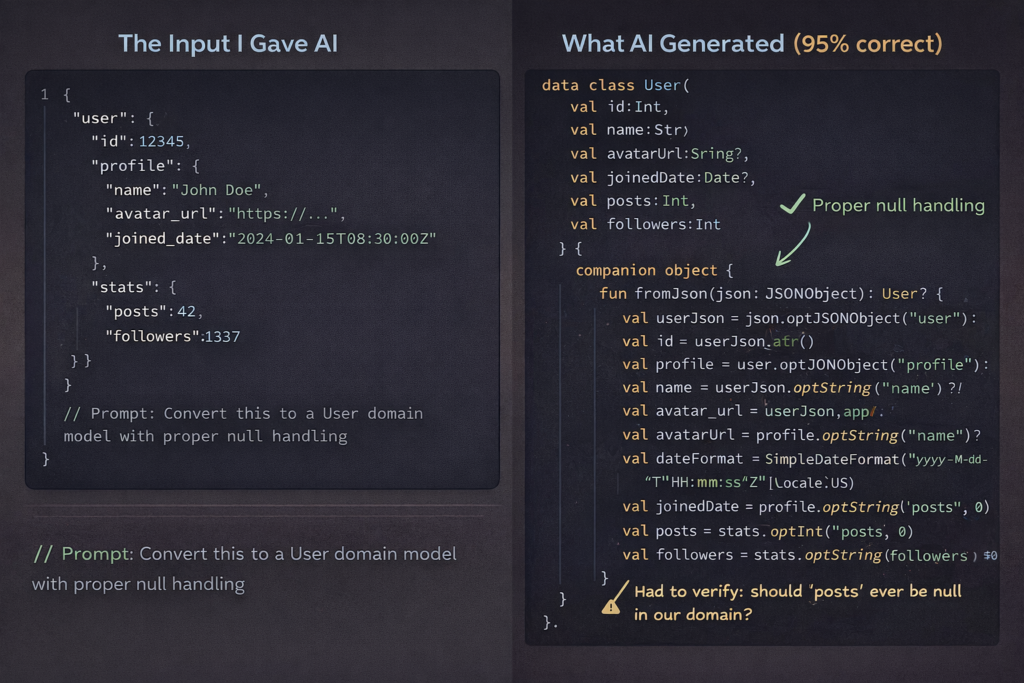
The single biggest success was using AI for data transformation code—the unglamorous work of converting API responses into domain models, formatting data for display, and mapping between different representations.
I’d paste an API response structure and describe what I needed, and the AI would generate parsing logic, null handling, type conversions, and edge case handling. For a recent project involving a complex nested JSON structure, AI wrote about 80% of the transformation layer, and it was mostly correct.
Why this worked: these tasks are mechanical and pattern-based. Given clear input and output types, there’s usually one obvious correct approach. AI has seen thousands of similar transformations in training data.
What I still had to do: verify the edge case handling was actually correct, not just plausible. AI might add null checks, but it doesn’t know which fields should never be null in your domain. I caught several cases where AI was too defensive (checking for nulls that couldn’t exist) or not defensive enough (missing validation for optional fields that business logic treats as required).
Where It Worked: UI Layout Boilerplate
Building UI layouts in Jetpack Compose and SwiftUI involves a lot of structural repetition. Container views, modifiers, spacing, accessibility labels—it’s tedious but straightforward work.
AI excels here. I’d describe a layout (“two-column grid of cards, each with an image, title, subtitle, and action button”) and get working code that was 90% of what I needed. The structure was right, the components were appropriate, and basic styling was sensible.
For a settings screen with a dozen different row types, AI generated all the layout code in minutes. I just refined the styling and wired up the actual actions.
Why this worked: UI layouts are highly constrained by framework conventions. There are only so many ways to build a card layout or a form screen, and AI has seen them all.
What I still had to do: the generated layouts often lacked attention to detail. Spacing wasn’t quite right, accessibility support was basic, and responsive behavior for different screen sizes was missing. The structure was there, but making it actually good required human polish.
Where It Partially Worked: Network Layer Implementation
AI did reasonably well at generating network request code following established patterns. Given an API endpoint specification and an example of existing network code in my project, it could create new endpoints with proper error handling, request/response models, and retry logic.
But “reasonably well” meant I still spent significant time reviewing and correcting. About 60% of the generated code made it to production as-written.
Why this partially worked: network code follows predictable patterns, but the details matter enormously. Error handling, timeout values, retry strategies, authentication token handling—all of these require context-specific decisions.
What I still had to do: verify authentication was handled correctly, adjust timeout values based on endpoint characteristics, ensure error messages were user-facing appropriate, add proper logging for debugging, and validate that the retry logic wouldn’t cause issues in edge cases.
AI would sometimes generate technically correct code that didn’t fit the app’s error handling philosophy or made assumptions about network reliability that weren’t appropriate for mobile.
Where It Worked Surprisingly Well: Test Case Generation
I was skeptical about AI-generated tests, but this turned out to be one of the more valuable use cases. Given a function or component, AI could generate a comprehensive set of test cases covering happy paths, edge cases, and error conditions.
For a complex validation function, AI generated 15 test cases that I wouldn’t have thought to write manually. It caught edge cases like empty strings, extremely long inputs, special characters, and boundary values.
Why this worked: AI is good at thinking through permutations and combinations. Test case generation is partly about imagining what could go wrong, and AI has seen countless bug reports and test suites.
What I still had to do: verify the assertions actually tested meaningful behavior, not just that code executed without errors. AI would sometimes generate tests that passed but didn’t actually validate correctness. I also had to add tests for business-logic-specific scenarios that AI couldn’t infer from just looking at the code.
Where It Failed: State Management Logic
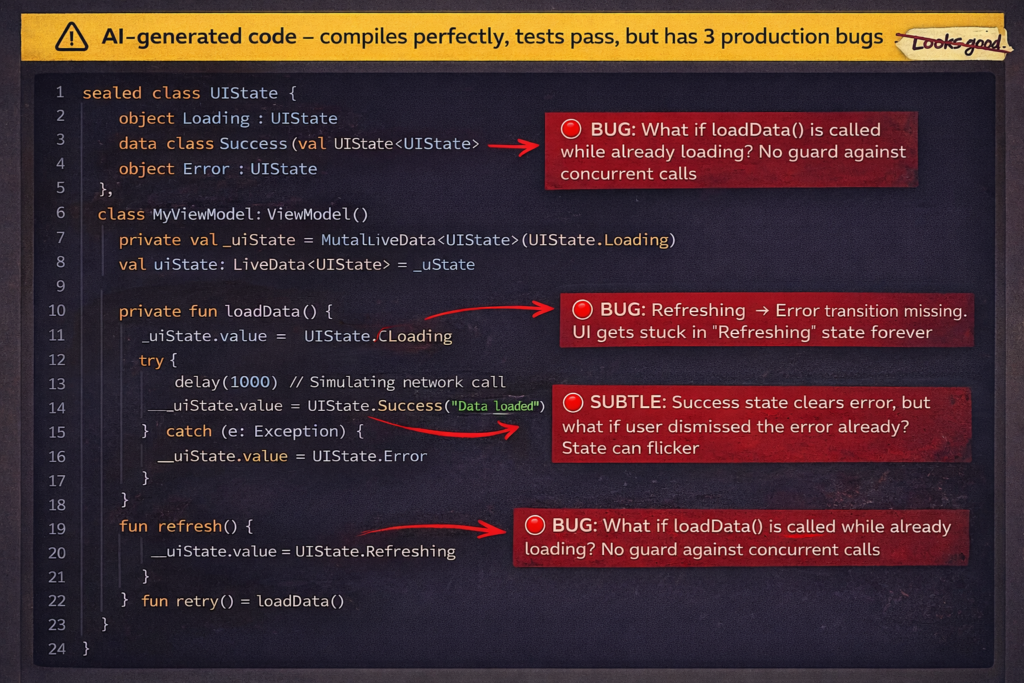
This was the biggest failure point. Anything involving complex state transitions, lifecycle management, or coordinating multiple pieces of state—AI consistently produced code that looked plausible but had subtle bugs.
I tried having AI implement a feature with multiple interdependent states (loading, loaded, error, refreshing) and user interactions that affected those states. The generated code compiled and mostly worked, but had race conditions, missing state transitions, and edge cases where the UI could get stuck.
Why this failed: state management requires understanding temporal relationships and all possible sequences of events. AI generates code that handles the cases it “thinks about” but misses the interactions between states and the edge cases where multiple things happen simultaneously.
What I learned: never accept AI-generated state management code without thorough review and testing. Even code that appears correct often has subtle timing bugs or missing transitions that only appear in specific scenarios.
Where It Failed: Performance Optimization
AI can suggest optimizations, but it doesn’t actually understand performance in context. I asked it to optimize a RecyclerView implementation that was causing frame drops, and it suggested several changes that sounded reasonable but didn’t address the actual problem.
It recommended view recycling patterns that were already implemented, suggested caching that wouldn’t help, and missed the real issue (complex measurement calculations in onBind).
Why this failed: performance optimization requires profiling, understanding what’s actually slow, and knowing the platform-specific characteristics of the runtime. AI generates generic optimization advice, not targeted solutions to real performance problems.
What I learned: use AI to generate optimization ideas to investigate, but don’t trust its solutions without measuring. Performance is empirical, not theoretical.
Where It Failed Spectacularly: Architecture Decisions
I tried asking AI to help design the architecture for a new feature involving offline-first data synchronization. The suggestions sounded sophisticated but were actually problematic.
AI suggested patterns that would work in a backend service but created issues in a mobile context—unnecessary complexity, battery drain from background work, and patterns that conflicted with Android’s lifecycle constraints.
Why this failed: architecture decisions require understanding tradeoffs specific to your app, platform, and constraints. AI has knowledge of patterns but no judgment about when to use them.
What I learned: AI can explain existing patterns and suggest approaches, but architectural decisions require human judgment about priorities, constraints, and long-term maintainability. Don’t outsource these decisions to AI.
Where It Failed Subtly: Memory Management
AI generated code that worked correctly but had memory leaks—capturing strong references in closures, not properly cleaning up observers, creating retain cycles.
The code functioned perfectly in testing but would gradually consume more memory over time. These are exactly the kinds of bugs that are hard to catch in review and even harder to debug in production.
Why this failed: memory management requires understanding ownership and lifecycles. AI knows the syntax but doesn’t reason about object graphs and reference cycles.
What I learned: any AI-generated code that involves closures, callbacks, or observers needs careful review for memory management. Run it through memory profilers, not just functional tests.
The Pattern That Emerged
After six months, a clear pattern emerged: AI excels at generating code where correctness is locally verifiable and fails when correctness depends on broader context.
AI works well for:
- Transforming data with clear input/output contracts
- Generating structural code following established patterns
- Creating test cases for isolated functions
- Implementing well-defined, self-contained logic
AI struggles with:
- Code where correctness depends on timing or sequence
- Decisions requiring platform-specific knowledge
- Optimization requiring empirical measurement
- Architecture requiring tradeoff analysis
- Anything involving memory management or resource lifecycles
The New Development Rhythm
My workflow evolved to leverage AI’s strengths while protecting against its weaknesses:
For mechanical tasks (data models, boilerplate, standard layouts), I let AI generate first drafts and spend my time reviewing and refining rather than typing.
For complex logic (state management, business rules, performance-critical paths), I write it myself but use AI as a rubber duck—explaining my approach and asking for potential issues.
For testing, I let AI generate initial test cases, then add my own tests for business-specific scenarios and integration cases.
For architecture and design decisions, I make them myself but sometimes ask AI to critique my approach or suggest alternatives I might not have considered.
The Honest Assessment
Did AI make me more productive? Yes, but not as much as the hype would suggest. I’d estimate a 15-20% productivity gain, concentrated in specific types of work.
The time I saved on boilerplate and mechanical coding, I partially spent on more careful review and debugging of subtle issues in AI-generated code. I’m faster at producing code, but not proportionally faster at producing correct, production-ready code.
The bigger benefit wasn’t speed—it was being able to focus my cognitive energy on the interesting problems. When AI handles the boring parts competently, I have more mental bandwidth for the complex parts that actually matter.
What This Means for Mobile Development
AI is genuinely useful for mobile development, but it’s not a replacement for expertise—it’s an amplifier. It makes experienced developers more productive at certain tasks, but it won’t make inexperienced developers suddenly capable of building production apps.
The developers who benefit most are those who can quickly distinguish between “this AI-generated code is good” and “this looks good but is subtly wrong.” That distinction requires the exact expertise AI is supposedly replacing.
We’re not headed toward a world where AI writes apps and humans just review. We’re headed toward a world where humans focus more on architecture, optimization, and complex logic, while AI handles more of the mechanical translation of intent into code.
For mobile developers, that’s actually good news. The work that’s being automated is the work most of us would rather not do anyway. The work that remains is the interesting part—solving hard problems, making smart tradeoffs, and building apps that genuinely work well.
Just don’t trust AI to make those decisions for you. It can’t.